KDP cover calculator: get your Amazon cover sized right the first time.
A rejected cover means a failed upload and days back in your design software. Catch the problem first, before you upload.
Know if your cover will pass, before you upload it
Checked against 150+ Amazon KDP print rules
Free to check. Find out what needs fixing before you pay
Get your exact spine width from the KDP calculator, worked out from your page count, paper, and binding
Ready in minutes. No design software. No KDP guesswork needed.
Pay only for the fix. One-time. No subscription.
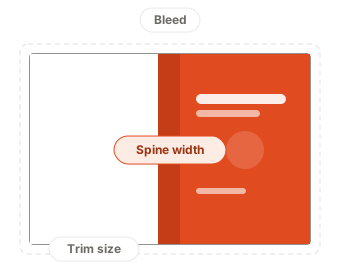
KDP cover size calculator
Tell our Amazon KDP cover calculator about your book and it'll work out the exact cover size, spine width, and bleed.
Why KDP covers get rejected, and how we fix it
A rejected cover costs you a failed upload, another round in your design software, and days of delay. KDP Always catches these seven mistakes before you upload to Amazon.
Spine width miscalculated
We work it out from your page count, paper, and binding, then build it into the file.
Bleed doesn't cover the edge
We extend it to the size KDP requires, so nothing white shows at the trim during Amazon KDP book printing.
Trim box out of sync
We reset it to match the correct trim size automatically.
Barcode area covered
Amazon stamps a barcode on every cover. We show you the exact box it lands in.
Image resolution too low for print
Sharp on your screen, blurry on paper. We flag it if anything on your cover is too low-resolution.
Text too close to the edge
We mark the safe area so you can see what's at risk of being trimmed off.
Front and back swapped
Easy to miss when every panel looks finished. We label both panels so you can check at a glance.
Free KDP cover template generator
Haven't made your cover yet? Run the KDP cover calculator above, and our free KDP template generator gives you a blank KDP cover template built to your book's measurements, so you design on the right canvas from the start. It's a free KDP book cover template, ready in seconds.
Sized to your book
The KDP cover template generator marks trim, bleed, and spine guides for you
Design anywhere
Drop it into Canva, Photoshop, or anything else and design on top
Free to download
Just sign in. No credit card, no catch
Will your cover pass?
Find out in seconds with the KDP Always Amazon KDP cover calculator. If something's wrong, we'll sort it out for you.
The check — free
Get your exact cover size before you've even drawn anything
Checked against 150+ Amazon KDP print rules
See how many issues your cover has
The fix — $9.99
A KDP-ready PDF. Size, bleed, spine, and trim box fixed for you
The exact numbers behind every fix, not just that something's off but precisely what to change it to
Ready in minutes. No design software needed
Cheaper than a freelance designer ($20–$200, days of back-and-forth)
Faster than fixing it yourself (12+ hours of trial and error)
One-time charge, not a subscription
Free to check. Pay only for the fix.
Frequently asked questions
Your full cover is the front, the back, and the spine side by side, plus bleed on all four outer edges. The spine depends on your page count, paper type, and binding, so it changes every time your page count does. Enter those details into our Amazon KDP cover calculator above and you'll get the exact size in inches or centimeters.
Amazon's print requirements run to 150+ rules, and details like spine width change with every page count, paper type, and binding combination. Checking by hand means digging through KDP's documentation and doing the math yourself, something a KDP calculator does in seconds. One missed decimal is enough to get your cover rejected. KDP Always runs the same checks in seconds and shows you what needs fixing before you pay for the exact fix.
It depends on how many pages you have and what paper you print on. White paper, cream paper, and color printing all have different thicknesses, and hardcover adds board on top. There's no single number, which is why guessing is the most common reason covers come back. That's exactly what our KDP calculator works out for you, the same way Amazon KDP checks it.
KDP asks for 0.125 inches (3.2 mm) of bleed on the top, bottom, and outer edges of a print cover. Bleed is extra artwork past the trim line, so that when the blade lands slightly off during Amazon KDP book printing, you still get color to the very edge instead of a white sliver. Our KDP calculator builds this bleed into your free template, and KDP Always adds it to the fixed file too.
Trim size is your finished book after cutting, for example 6 x 9 inches. Cover size is the whole printed sheet that wraps around it, which is roughly twice the trim width plus the spine plus bleed. People often design at trim size by mistake, which makes the artwork far too small. The KDP calculator gives you the full cover size from your trim size, so you start on the right canvas.
Right here. KDP Always's free KDP cover template generator builds a blank cover template to your book's measurements, with the trim, bleed, and spine already marked. It's free, and it opens in Canva, Photoshop, or anything else you design in.
There isn't one answer, because it changes with your trim size and page count. A 200-page 6 x 9 paperback needs a different cover from a 400-page one, even though the books look the same size on a shelf. Enter your details into the Amazon KDP cover calculator above and you'll get the exact figure rather than a rough guide.
KDP accepts both and converts your file automatically when it prints, so KDP Always never charges you to change color mode. Do keep in mind that bright screen colors can look duller once printed, whichever mode you supply.
Yes. You don't need to know spine formulas or KDP's print requirements. Enter your book's trim size, page count, paper, and binding into the Amazon KDP cover calculator, and KDP Always works out the exact numbers for you. If something's off, we fix the sizing automatically (size, bleed, trim box) and pinpoint exactly where anything else needs a look, so you can fix it and recheck for free until it passes.
No. We never keep a copy of your file. It's checked in memory and never saved to disk, and we don't share it with anyone.
Yes. KDP Always supports both paperback and hardcover, and the KDP template generator makes a template for each.
Books that read left to right, such as English. Right-to-left books (for example Japanese, Hebrew, and Yiddish) aren't supported yet, and the specs we check follow kdp.amazon.com.