A KDP paperback cover template shows bleed around a trim line, while a KDP hardcover template shows a wrap that folds around the board and a hinge next to the spine. The two are not interchangeable. Pick the template that matches the binding you're printing, and if you're releasing both, use one template for each.
This guide from KDP Always walks through what each template shows, where the two differ, and how to get the right one for free.
Need yours right now? KDP Always's free KDP cover calculator builds a KDP paperback cover template or hardcover template from your trim size and page count.
Which KDP paperback cover template or hardcover template do you need?
Your binding decides it. A paperback needs a KDP paperback cover template, and a hardcover needs a KDP hardcover template. Publishing the same book in both formats means two templates and two separate cover files.
Not sure how they differ? Here's how each one is built.
| Feature | KDP paperback | KDP hardcover |
|---|---|---|
| Cover | A soft cover printed on 80 lb (220 GSM) white paper stock, with a glossy or matte finish. | Rigid boards with your art printed directly on the cover. It's a case laminate hardcover, so there's no dust jacket. |
| Edges | The printer trims the cover to size after printing. | The printed sheet wraps around the boards and gets glued to the inside of the cover. |
| What your template shows | Bleed past the trim line | A wrap, plus a hinge next to the spine |
That's why a KDP paperback template and an Amazon KDP hardcover template look so different.
If you haven't picked a binding yet, paperback gives you more options: 16 trim sizes, standard color ink, and books as short as 24 pages.
Amazon KDP treats a hardcover as its own edition, with its own ISBN and a new cover file that meets hardcover specs. Hardcover also comes with tighter limits than paperback:
- Only five trim sizes are available for hardcover.
- A hardcover must be between 75 and 550 pages.
- Standard color ink is paperback only.
If you're still choosing a trim size, KDP Always's guide to KDP book sizes lists every paperback and hardcover option.
What a KDP paperback cover template shows
A KDP paperback cover template lays out one flat image with the back cover, spine, and front cover side by side. Around the outside runs the bleed, an extra strip that extends 0.125" past the trim line on the top, bottom, and outer edges. Your background should stretch all the way through it, so a slightly off cut never leaves a white edge.
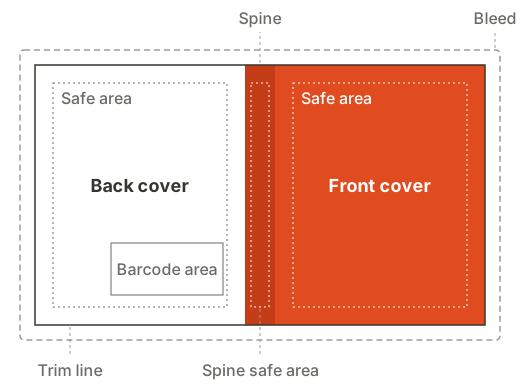
Inside the trim line, the template marks a safe area for text, a spine with its own safe area, and the area on the back cover where Amazon prints the barcode. Every KDP template for paperback is built for one page count, because the spine gets wider as the book gets thicker.
Planning text on the spine? We recommend at least 80 pages before you put any text there.
For a line-by-line walkthrough of a KDP paperback cover template, see how to use KDP cover templates.
What changes on a KDP hardcover template
An Amazon KDP hardcover template has no bleed and no trim line. Amazon prints a hardcover cover as a case wrap, so the artwork folds around the board and gets glued inside, which changes four things:
- Wrap instead of bleed. Artwork extends 0.59" past the edge of the book. That strip wraps around the board, so nothing important belongs there.
- Text is measured from the book edge. Keep all text and important images at least 0.125" inside the edge of the book.
- A hinge on each side of the spine. There's a 0.39" strip between the spine and the safe area on both covers, where the book bends open. Text or a barcode placed there can distort.
- The barcode moves up. It sits higher than on a paperback, at least 0.375" above the bottom edge of the book and at least 0.25" from the hinge.
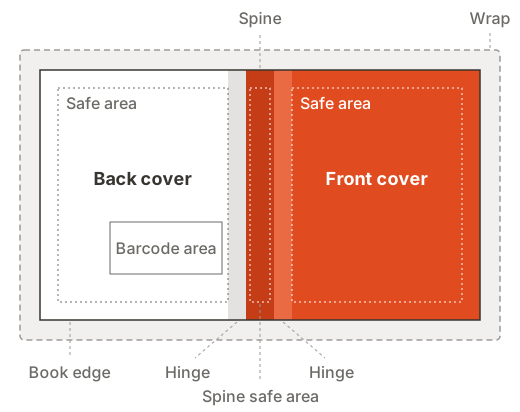
The spine on a hardcover template still depends on your page count, so a template made for one page count won't fit another.
KDP paperback template and hardcover template side by side
| Feature | KDP Paperback Template | KDP Hardcover Template |
|---|---|---|
| Outer edge | Bleed past the trim line | Wrap that folds around the board |
| Text placement | Inside the safe area | 0.125" inside the book edge |
| Next to the spine | Spine safe area only | 0.39" hinge on each side, no text or barcode |
| Barcode | Placed by Amazon on the back cover | At least 0.375" above the bottom edge of the book, 0.25" from the hinge |
| Trim sizes | 16, plus custom sizes | 5 |
| Page count | Depends on trim size and ink | 75 to 550 |
| Ink | Black, standard color, premium color | Black, premium color |
Measurements for hardcover come from Amazon KDP's hardcover cover templates. Paperback page ranges vary by trim size, paper, and ink.
How to get a free KDP paperback template or hardcover template
The KDP cover calculator by KDP Always builds a free KDP paperback cover template or hardcover template from your book's details. Each KDP template for paperback or hardcover labels every line with what it means, and the hardcover version marks the hinge as its own band, so you don't have to guess which strip is which.
Here's how to use it:
- Choose paperback or hardcover.
- Enter your trim size, ink, paper, and final page count.
- Download the template and place it as the bottom layer of your design file.
- Design on top of it, then hide the template layer before you export.
Watch out for one thing when you search for a KDP template for paperback books. Some results are manuscript templates, which Amazon KDP offers as Microsoft Word files for formatting the inside of your book. Those set up your interior pages, not your cover.
Mistakes when you reuse a KDP paperback cover template for a hardcover
Turning a paperback into a hardcover edition is an easy place to mix up templates. Here's what can go wrong:
- Stretching the paperback file. Scaling the artwork up to the hardcover size doesn't create a wrap or a hinge, so text ends up too close to the fold.
- Text in the hinge. A title or tagline that sat comfortably near the spine on the paperback can land in the hardcover hinge.
- Forgetting the barcode moved. Design elements placed just above the paperback barcode area can get covered on the hardcover.
- Keeping an old page count. If the hardcover interior has a different page count, the spine width changes too, so make a new hardcover template for the final number.
The safest habit is to start every edition from a fresh template and move your artwork onto it, rather than editing the old file. When you're ready to export, the export checklist in how to use KDP cover templates covers fonts, resolution, and transparency.
Frequently asked questions
A KDP paperback cover is your back cover, spine, and front cover side by side, plus bleed on every outer edge. The width and height start from your KDP book size, and the spine width depends on your page count and paper type. A KDP paperback cover template from the KDP cover calculator adds it all up for you.
Start from a KDP hardcover template sized for your trim size and page count. Extend your artwork through the wrap, keep text inside the safe area, and leave the hinge next to the spine free of text and the barcode. Then export one flat PDF at 300 DPI with fonts embedded.
It depends on which file you're formatting. For the interior, Amazon offers Microsoft Word manuscript templates. For the cover, you need a KDP paperback template or KDP hardcover template built for your exact book, which you can get for free from the KDP cover calculator by KDP Always.
Not by resizing it. Amazon asks for a new cover file for the hardcover edition, and a hardcover cover uses wrap and hinge areas that a paperback file doesn't have. Get a fresh KDP hardcover template and move your artwork onto it, rechecking every piece of text against the new lines. You can download one for free from the KDP cover calculator by KDP Always.